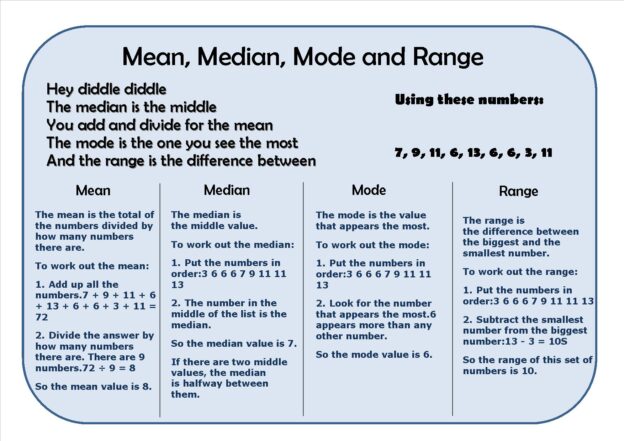
Understanding the fundamental principles of statistical analysis is essential. This guide aims to provide a clear, no-nonsense explanation of the basic concepts of mean, mode, median, range, and average.
Continue reading
Understanding the fundamental principles of statistical analysis is essential. This guide aims to provide a clear, no-nonsense explanation of the basic concepts of mean, mode, median, range, and average.
Continue readingLast Sunday I hosted a barbecue for the Committee of the BCS Birmingham Branch and thought I’d share a few of the photo’s that we took with you.
After the Branch Committee’s request for new Committee member applicants I’m very pleased to say we had five people come along and take up new positions on the Committee. We’re fortunate to be joined by Martin Froggatt, Rob Gilliam, Steve Harris, Dawn Peers and Hugo Russell, and most welcome they are too!
This bring the size of the Committee back up to a healthy twelve members, which is excellent, however we on the Committee thought that it would be good idea to hold a small event to help everyone get to know each other, and hopefully build a sense of camaraderie, outside of the usual Committee meetings and BCS Birmingham Branch events (one of which is on Tuesday the 15th evening). I was happy to host and for my part I wanted to say ‘thank you’ to the long serving members of the Committee for all of their dedication (as well as a couple of long serving ex-Committee members too).
We’ve also recently started to reboot the Branches approach to social networking technologies and will be refreshing the BCS Birmingham Branch facebook page, please consider joining if your a BCS member and either associated with or interested in the Birmingham Branch.
And here’s those photos I mentioned, as you can see we all had an excellent time, and as Peter Crouch had to say “Thanks also for posting Donna’s photos on the Web, now everyone can see what the Birmingham Committee does on a Sunday afternoon!”.
| www.flickr.com
|
Apologies to all my blog readers I’ve been lax of late and haven’t posted a great deal recently, and I’m afraid that in an attempt to clear down all the draft blog entries I have prior to the transition and acquisition (of Sun by Oracle, of course) I’ll be posting a number of blog entries in quick succession, some of which I expect may need expanding upon in the future.
Topics I have to complete include part three of my provisioning article series, a number of posts on Google and the Google architecture, a number of posts on UK Government messaging systems, specifically DIS, a number of posts on the continuing issues with the economy and innovation and science spending in the UK, as well as a few others.
On the economy side, I was hoping to follow up my articles “DBERR’s views on the future growth of the UK economy ‘New Industry, New Jobs’” and “Industry contributions to the UK economy and investment in R&D; by industry” with pieces which might include looking at:
But for now I’ll see how I get on!
You’d imagine Twitter integration in Disqus couldn’t get any better, however speaking with Daniel Ha at Disqus I hear even more improvements are on the way.
If you haven’t seen how Disqus integrates with Twitter (and incidentally what Disqus integration looks like with blogs.sun.com, or any other Apache Roller Weblogger based blog system) have a look at this blog entry which has generated a few traditional comments, but quite a few tweets, and see how Disqus displays them all as part of that conversation too:
https://blogs.sun.com/eclectic/entry/reasons_projects_and_programmes_fail
You’ll need to scroll down to the bottom of the page, but as you can see Disqus has captured a lot of the tweets and retweets about the article, which I think is pretty cool. Disqus also does the same for Facebook and a host of other social networking platforms as well.
Talking to Daniel he said that tweet and social networking metrics and “count” was on the way as well as other advancements, so I am firmly looking forward to those when they arrive.
The great thing about Disqus is that it is firmly becoming a conversation catcher and conversation engine, which is really what I want, to capture disparate conversations about what I write in an aggregate manner.
If you are interested in integrating Disqus with your Sun blog or any other Apache Roller Weblogger based blog, I have a tutorial and overview over here, along with the code and code examples you need to use:
https://horkan.com/2008/09/09/disqus-integration-bsc-roller-weblogger
Thought you might be interested in the the web analytics used on this blog; in total there are five pieces of technology collecting data and then used for performing web analysis here. They are:
Why use more than one? Frankly web analytics is more than a shaky area, none of them ever seem to catch all hits just as I’d like, nor measure them in a similar fashion, so I use differing web analytic software to ‘triangulate’ the best view possible (for instance one will count some spiders traffic as hits, whilst another won’t, frankly I want to know the difference between humans and the web crawlers, etc.). Furthermore some have functionality which the others don’t and some produce quick to see ‘snapshots’ whilst others produce detailed ‘drill-downs’.
For instance Sun’s web analytics is the same as the corporate one, so it’s enterprise grade and highly flexible, sadly this means it’s extremely large scale and quite hard to manipulate because the amount of configuration you have to do is just horrendous (but it can give you the most detail).
So SiteCatalyst / Omniture is too much hassle to produce quick updates and ClustrMaps is really eye candy for users, therefore I only really use SiteMeter for quick updates without logging in, and StatCounter and Google Analytics for more detailed, but quickly available, reports on what constitutes readers favourite articles and pages.
For 2 to 5 above you’ll need to sign up for online accounts and add the tracking code yourself, this isn’t too hard, it just takes a little time.
For 1 it’s already there on all the Sun websites and blogs, however you need to request access to the corporate Omniture / SiteCatalyst web analytics system to get access if you are a Sun blogger, then you have to learn how to use it, then you need to use something else as well (see problems I describe above, because you might prefer a quick info ‘fix’).
Most of all this is about personal preference, and what works for you; for about two years after starting blogging I was a data demon, wanting to understand and interpret the stats, and now, well I’m a little more relaxed.
Given that today marks the 5th year of https://blogs.sun.com (or just “bsc” to us Sun bloggers), and that it was this month two years ago that I published my first blog article (entitled “And finally“, an opinion piece on Gartner’s top ten predictions from 2007), I thought it would be nice to explore what “success” was in terms of blogging.
The most obvious indicator is large and regular readership, but I can’t imagine that that is all there is to it. The next most obvious criteria might be opinion setting, but measuring this seems troublesome and unscientific at that moment (until at least further semantic web infrastructure is in place to better relate meme flow across the Internet, although saying that Autonomy have an excellent visual analysis tool which is an early leading example in this field, the problem with this current non-semantic web model is that you have to generate meta-data by supposition, some of which is irregular at best).
Inward and outbound links are a major contributing factor in the calculation of Google’s “PageRank” algorithm, but I expect this to change significantly in the next few years as two things occur, increasingly effective “Search Engine Optimization” (SEO) techniques which will require modification to Google’s rating criteria, and the rise of the semantic web as increasing amounts of meta-data is included with unstructured data across the Internet, driving up implicit relationships between information.
And that leaves me with syndication and pieces written in response to your articles. Frankly I’m not sure that you can qualify syndication as a measure of success of your blog, but I do think it’s a good indicator of how far your message is being spread. I’m still uncomfortable with this, as I would prefer something more Empirical, however I think it may be about the best ‘soft’ indicator we have at the moment.
So using syndication of, and responses to, my articles, as a potential leading indicator, I correlated the following list. Historically I would have used Technorati to generate this information, but Technorati is suffering from some real issues lately, it’s page layout has become befuddled, and worst of all it’s not capturing (even remotely) the responses to my articles, subsequently I used Google Analytics’ “Referring Sites” breakdown instead (the list below isn’t remotely exhaustive, so if there is anything missing you’d like me to add let me know).
Given I’ve only been blogging for around two years I’m extremely pleased with the reaction and coverage I’m getting so far, which, in terms of success, works for me. The most successful articles from above appear to be those focused upon Cloud Computing, Business, Technology and Enterprise Architecture, Government IT, and large scale and complex systems, so expect more in a similar vein, as well as a focus upon the emerging field of “Web Science”. I have to admit I wasn’t keen on blogging initially, and felt rather badgered into it; at the time blogging seemed terribly self-referential to me. However it’s been a genuinely pleasant surprise to find people have enjoyed the articles and have gone on to re-use them and the ideas contained within. Many thanks to all my readers for all the encouragement along the way!
…so little time. …..
Posted this in response to an internal email titled “What makes Google notice a blog?”, it’s pretty universal and applicable to most search engines so I thought I’d share it as a blog article.
Here’s a few suggestions, hope they help. Wayne.
1) You may want to write your blog in a manner which is spider, as well as human, friendly.
Include meta-data and micro-format information, such as tags; don’t forget that key words in headers will increase the ‘value’ of that key word (for many search engines); always make sure that “SCRIPT” HTML segments are followed by “NOSCRIPT” segments (most spiders don’t “do” JavaScript, specifically Google’s; lean web page code that is easy for spiders to ‘consume’.
Re: Tags / Meta-Data / Micro-Formats – I use the Operator plug in / add on for Firefox, this informs the user about semantic data embedded in a viewed web page.
Re: Keyword Analysis – I use the SeoQuake plug in / add on for Firefox, which allows me to do dynamic keyword (and related key word) analysis.
Here’s an article I wrote on Tag format standardization, I recommend that you standardize on a Tag format that is Search engine friendly: ‘Tic, Tag, Toe‘. Don’t over tag nor under tag, but try and match your articles tags with other similar articles, try and join in with the subject matter’s folksonomy if at all possible (i.e. the tags people are using when talking about that subject matter, technorati and delicious are both good examples).
As well as embedding all the tags for all of the articles on the front page (have a look in Operator if you decide to use it or another semantic data ‘explorer’) I also embed tags to major blog directories and social bookmarking sites on the individual page for each entry, here’s an article which demonstrates this: ‘Roller Weblogger blog post tag link code for blogs.sun.com, technorati and del.icio.us‘. I’ve superseded this code now, with a nicer layout and having added more blog directories / social bookmarking sites, you can see the example at the end of the page for any given blog article I’ve written, give me a shout if you’d like the newer code.
2) Google’s PageRank algorithms work on links, inbound, outbound, number, and the PageRank of those inbound and outbound links.
Link to sources, get inbound links from sources / reciprocal links if possible.
Don’t forget to trackback articles that you reference, if the trackback fails try leaving a comment with a link to the article that references it.
3) Make sure you let sites such as Google know you’ve updated your site and that you’d like it re-“spider”ed, indexed and advertised.
This is done by “blog pinging” search engines and blog directories so that they are informed that your site has been updated and to send over there spiders when they get chance (most search engines / blog directories want to do this quite quickly as they want to be first with any potentially newsworthy content that draws traffic).
Personally I wanted a more granular level of control over this than offered with the standard blog ping functionality embedded in roller and so I wrote my own stand alone version: ‘Free XML-RPC blog ping site submitter: “Blog Ping”‘.
4) Other things to consider…
PageRank of your site and individual pages; how well does your article compete with articles of a similar nature.
Have pages been bookmarked in del.ici.ous, technorati, etc., i.e. are they being shared.
P.S. This article doesn’t mention quality of written articles, cadence of posts, timeliness of posts to current events, etc., as it focuses purely on the current electronic mechanisms for getting noticed by a search engine like Google and not the related, but extremely important, human and social element that gains you readership.
I’ve wanted to apologise to Alec Muffett for some time about a blog post I wrote back in January ’08. Called “Links for DD-MM-YYYY Not Likely” it questioned the effectiveness of “Links for” type posts to connect with your readership in a meaningful way; as well as being a response to Alec’s post “A disappointed (occasional) reader…“.
This has become especially ironic as eight months later I followed up with “Setting up del.icio.us blog posting on blogs.sun.com“, a post showing in detail how to configure delicious, the online bookmark system, to post entries to Roller Weblogger (and specifically the implementation powering the Sun blog server). To top it all I’ve become a regular provider of “Links for” posts since then too.
Furthermore I’ve found the “Links for” type post a useful way to communicate in a conversational manner with my readers. It allows me to post short opinion based entries to my blog, giving me a chance to have my say when circumstances wouldn’t or shouldn’t allow a longer blog post, as well as improving the overall cadence of updates, which has suffered when I’ve been time constrained.
I actually gave Alec a call a couple of months ago and apologised in person; I wrote this blog post after being reminded by Carolyn’s comment that I had a responsibility to put things straight online too.
Thanks to Tim Caynes I have a brand new look and feel on the blog; thankfully this is much more minimalist and I’m hoping easier to navigate for you. …..
Recently I have received a number of emails about del.icio.us blog posting “links for” working with blogs.sun.com (BSC) or rather not as the case may be, as they have all vented frustration about it not working (either well or at all).
Dave Johnson, the man behind Roller Weblogger itself (the platform BSC runs over), suggests alternative approaches to achieving the same result, most notably using a standalone tool described in “delicious.com Blog Posting tool“.
I was similarly frustrated having just configured the delicious blog posting tool (and getting it to work), however I have since found that the issues I faced were due to not reconfiguring my XML-RPC password after the recent upgrade to the external Identity authentication and authorisation security mechanism used to access BSC.
To get it to work again I had to reconfigure both my BSC and del.icio.us accounts.
First off I had to go into the “Your Profile” page in my BSC account.
Then I had to configure a “Web Client API Password”, as in the screen grab below.
After reconfiguring my BSC account I had to change the user name and password combination in the del.icio.us blog posting settings page.
The user name now needs to be set-up as your email address (and not the old style BSC user name, which matched your blog ‘handle’), whilst the password needs to be configured as the same as the “Web Client API Password” above, see the following graphic for more detail.
Another item to note is that “blog_out_id” needs to be set as your BSC ‘handle’, whilst I’ve found “out_cat_id” has little effect (as the posts default to whatever “Category for posts received via clients” is set to in your BSC blog preferences).
Remember to set “Enable weblog client support?” in your BSC blog preferences to get any of this this to work in the first place.
¨C11C
Since reconfiguring the two accounts above it’s been working consistantly and I feel safe enough to blog about it as a way forward.
I originally found out about setting up del.icio.us blog posting from the blog post “Posting from del.icio.us to Roller” from Lars Trieloff’s Collaboration Weblog. This worked fine until the change to access was implemented at BSC, and would presume it’s advice still holds for the majority of cases (outside of BSC).
¨C12C ¨C13C¨C14C
Links for this article:
I’ve recently updated my site to use Disqus the blog comment hosting and conversation site.
Done this for two reasons:
I’ve already had a couple of comments from Disqus members, and I’ll have to see how it goes before I start heralding it as an unprecedented success, but I’m very pleased with the results (both aesthetic and functional).
Sadly the Disqus comment import function was initially provided for WordPress and Blogger, but apparently wasn’t fully functional; subsequently an update is due out soon that will hopefully include Roller Weblogger. See this Disqus forum entry, and it’s threads for more info: How do I import comments?
Given this was the case I wanted to make sure my blog supported my new Disqus commenting system, but would still show my old comments if there where any for an entry. Here are a few examples:
The code I developed, which has to be separated into two components (number of comments associated with a blog entry, and comment entry form and comment display), is below, but if you use or copy it please note that you need to replace the Disqus supplied JavaScript for my site with your Disqus comments hosted sites JavaScript code. ¨C18C
For comment numbers I’ve broken it down into displaying “n Comments” for Disqus on it’s own, whilst “x Comments (new, via Disqus) and y Comments (legacy, via Roller)” for comments hosted on both systems.
This replaces the code in the Roller Weblogger “_day” template which displays the number of comments per blog entry.
Don’t forget to replace occurrences of ‘eclectic’, my blog handle, with yours (just one, about the fifth line from the end).
## Number of Comments
<a href="$url.entry($entry.anchor)#disqus_thread">View Comments</a>
#set($commentCount = $entry.commentCount)
#if ($commentCount > 0)
(new, via <a href="https://web.archive.org/web/20090830081824/https://www.disqus.com/" target="_blank">Disqus</a>) and
#if ($commentCount == 1)
<a href="$url.comments($entry.anchor)">$commentCount Comment</a> (old, via <a href="https://web.archive.org/web/20090830081824/https://rollerweblogger.org/" target="_blank">Roller</a>)
#else
<a href="$url.comments($entry.anchor)">$commentCount Comments</a> (old, via <a href="https://web.archive.org/web/20090830081824/https://rollerweblogger.org/" target="_blank">Roller</a>)
#end
#end
<script type="text/javascript">
//<[CDATA[
(function() {
var links = document.getElementsByTagName('a');
var query = '?';
for(var i = 0; i < links.length; i++) {
if(links[i].href.indexOf('#disqus_thread') >= 0) {
query += 'url' + i + '=' + encodeURIComponent(links[i].href) + '&';
}
}
document.write('<script type="text/javascript" src="https://web.archive.org/web/20090830081824/https://disqus.com/forums/eclectic/get_num_replies.js' + query + '"></' + 'script>');
})();
//]]>
</script>
This basically displays the Disqus commenting system, along with any Disqus hosted comments, however if any ‘legacy’ Roller Weblogger hosted comments are found it displays those too.
It replaces the code in the Roller Weblogger “permalink” template which displays comments themselves (the same changes may need to be made to the “weblog” and “searchresults” templates too).
## Comments
<h2>Comments (new, via <a href="https://web.archive.org/web/20090830081824/https://www.disqus.com/" target="_blank">Disqus</a>)</h2>
<div id="disqus_thread"></div><script type="text/javascript" src="https://web.archive.org/web/20090830081824js_/https://disqus.com/forums/eclectic/embed.js"></script><noscript><a href="https://web.archive.org/web/20090830081824/https://eclectic.disqus.com/?url=ref">View the forum thread.</a></noscript><a href="https://web.archive.org/web/20090830081824/https://disqus.com/" class="dsq-brlink">blog comments powered by <span class="logo-disqus">Disqus</span></a>
##showWeblogEntryComments($model.weblogEntry)
##showWeblogEntryCommentForm($model.weblogEntry)
<br></br>
#set($commentCount = $entry.commentCount)
#if ($commentCount > 0)
<h2>Comments (old, via <a href="https://web.archive.org/web/20090830081824/https://rollerweblogger.org/" target="_blank">Roller</a>)</h2>
#showWeblogEntryComments($model.weblogEntry)
<br></br>
#end
Additional benefits that I’ve picked up by implementing Disqus include:
Finally here’s my Disqus profile for you to have a look at: https://www.disqus.com/people/wayne_horkan/
Links for this article:

Yes, that’s right; they are all suffering from functionality issues due to design flaws introduced in their last look and feel upgrades.
Looks like this is the month for it, because in rapid succession we’ve seen changes at all three of these web2.0 stalwarts.
So how have these changes effected functionality, and what’s the real problem at hand ?
Along with the recent problems at Twitter around “outbound SMS messages” it’s turning out to be quite the month…
First reported by RiverCoolCool on his blog: https://rivercoolcool.spaces.live.com/blog/cns!D6F05428A2B8CB48!1570.entry
Then by Gizmondo: https://gizmodo.com/5035456/blue-screen-of-death-strikes-birds-nest-during-opening-ceremonies-torch-lighting
Now it’s at the Register: https://www.theregister.co.uk/2008/08/13/olympics_blue_screen_death/
But what’s genuinely amusing about this is the comments that are coming up, they range from the obvious to the really quite odd.
There are the standard comments lambasting Microsoft, but I think these should be disregarded; basically because they are boring in the extreme and especially given how interesting some of the other comments are.
Comments at the Register can be found here: https://www.theregister.co.uk/2008/08/13/olympics_blue_screen_death/comments/
The comments seem to be breaking down into a number of camps:
Frankly what’s so very wrong with the idea that the pictures are genuine, that it is a valid copy of Windows, that there hasn’t been a hardware error, and that, just perhaps, software goes wrong occasionally?
It just takes a little application of Ockham’s Razor to see the truth here.
Seeing as I’ve been blogging about Twitter and it’s new lack of support for outbound SMS for Europe, the UK and the rest of the World (well, apart from the US, Canada and India, that is)…
And seeing as it’s generated a ton of page hits…
I thought I’d take this opportunity to invite you all to follow me.
You never know I might even follow you back.
Here’s what I’ve been Twittering (or is that Twitting, lol) about.
I received the following email this morning, apparently they’ll be no more outbound Twitter SMS for Europe, the UK and most of the rest of the World. The only countries to be keeping the outbound SMS service are Canada, India, and the US. Apparently it’s all down to the charges that our mobile network operators charge us for SMS delivery, which initially Twitter had been subsidising, however they can’t afford to do that any more and have begun to “rein in the cost” by disabling the service. I can’t blame them, however I think it’s a shame that they set a precedent by enabling this functionality, only to take it away.
Oh, and good luck to them as they “negotiate with mobile operators in Europe, Asia, China, and The Americas” but I can’t see this service coming back any time soon. And I wonder how long it will be before people are trying to find a way round this decision, potentially by spoofing a US, Indian or Canadian address, given that each of the solutions they have suggested have a cost to the user (either to deliver the SMS itself or to contribute to the datalink to the WAP service)
Hi,
I’m sending you this note because you registered a mobile device to work with Twitter over our UK number. I wanted to let you know that we are making some changes to the way SMS works on Twitter. There is some good news and some bad news.
I’ll start with the bad news. Beginning today, Twitter is no longer delivering outbound SMS over our UK number. If you enjoy receiving updates from Twitter via +44 762 480 1423, we are recommending that you explore some suggested alternatives.
Note: You will still be able to UPDATE over our UK number.
Before I go into more detail, here’s a bit of good news: Twitter will be introducing several new, local SMS numbers in countries throughout Europe in the coming weeks and months. These new numbers will make Twittering more accessible for you if you’ve been using SMS to send long-distance updates from outside the UK.
Why are we making these changes? Mobile operators in most of the world charge users to send updates. When you send one message to Twitter and we send it to ten followers, you aren’t charged ten times–that’s because we’ve been footing the bill. When we launched our free SMS service to the world, we set the clock ticking. As the service grew in popularity, so too would the price.
Our challenge during this window of time was to establish relationships with mobile operators around the world such that our SMS services could become sustainable from a cost perspective. We achieved this goal in Canada, India, and the United States. We can provide full incoming and outgoing SMS service without passing along operator fees in these countries. We took a risk hoping to bring more nations onboard and more mobile operators around to our way of thinking but we’ve arrived at a point where the responsible thing to do is slow our costs and take a different approach. Since you probably don’t live in
Canada, India, or the US, we recommend receiving your Twitter updates via one of the following methods.
- m.twitter.com works on browser-enabled phones
- m.slandr.net works on browser-enabled phones
- TwitterMail.com works on email-enabled phones
- Cellity [https://bit.ly/12bw4R] works on java-enabled phones
- TwitterBerry [https://bit.ly/MFAfJ] works on BlackBerry phones
- Twitterific [https://bit.ly/1WxjwQ] works on iPhones
Twitter SMS by The Numbers
It pains us to take this measure. However, we need to avoid placing undue burden on our company and our service. Even with a limit of 250 messages received per week, it could cost Twitter about $1,000 per user, per year to send SMS outside of Canada, India, or the US. It makes more sense for us to establish fair billing arrangements with mobile operators than it does to pass these high fees on to our users.
Twitter will continue to negotiate with mobile operators in Europe, Asia, China, and The Americas to forge relationships that benefit all our users. Our goal is to provide full, two-way service with Twitter via SMS to every nation in a way that is sustainable from a cost perspective. Talks with mobile companies around the world continue. In the meantime, more local numbers for updating via SMS are on the way. We’ll keep you posted.
Thank you for your attention,
Biz Stone, Co-founder
Twitter, Inc.
Here’s some code that improves on the default Roller Weblogger blogroll code to ensure that if you include an image / icon for your blogroll entries it displays the image and the blogroll entry name (good if your using icons).
Using the default roller macro for displaying your blogroll means that no text is displayed if an image / icon URL is given. The default behaviour leaves rather empty lists of course, so I see this as an improvement.
So this code is effectively a replacement for “#showBookmarkLinksList($rootFolder false false)”, although it still uses the same CSS notation for lists, so as not to disturb your design.
It works with specific blogroll folders, so you do need to dictate which one your going to display (in the example below it’s “/My Blog Roll”). However this could be improved further to pick up the current folder name if you were to cycle through the sub folders (but I didn’t need it to do that, so I haven’t).
#set($rootFolder = $model.weblog.getBookmarkFolder("/My Blog Roll"))
#if ($rootFolder.bookmarks.size() > 0)
My Blog Roll
#foreach ($bookmark in $rootFolder.bookmarks)
-
$bookmark.name
#end
#end
Here’s some code that produces tag links to four popular tag destinations, your blog, blogs.sun.com, technorati and del.icio.us (for your Roller Weblogger based blog, as the code is velocity).
It also ensures that the links are marked as tags, so that crawlers that look for and index tags and tag data will pick them up (microformat and semantic web focused applications, like the ‘Operator’ plug in for Firefox also pick them up of course).
I only add it to individual entries, rather than collections, which is what “#if ($model.permalink)” checks for.
Best to add just before or just after the Comments section in your main Roller template.
The code also includes some functionality to replace ‘-‘ and ‘+’ with ‘ ‘, so as to make the text fit in the table (this does not affect the tag).
You can see this functionality here, on my blog, and on Bill Vass’ blog, however you will need to look at an individual blog post to see it.
If your on bsc you’ll need to replace ‘eclectic’ with your bsc blog name, or if your not on bsc you’ll need to replace “https://blogs.sun.com/eclectic/” with your entire blog URL.
Here’s the code:
#if ($model.permalink)
Tags
This blog
Sun Blogs
Technorati
Del.icio.us
#set ($mytags = $entry.tags) #foreach ( $tag in $mytags ) #set ($tagText = $tag.name) #set ($tagTextNew = "") #if ($tagText.length() > 0) #set ($toDo = $tagText.length() - 1) #set ($number = 0) #foreach ($number in [0..$toDo]) #if (($tagText.charAt($number) == "-") || ($tagText.charAt($number) == "+")) #set ($tagTextNew = $tagTextNew + " ") #else #set ($tagTextNew = $tagTextNew + $tagText.charAt($number)) #end #end #end
$tagTextNew
$tagTextNew
$tagTextNew
$tagTextNew
#end
#end
So here’s the latest version of my Google Translation code for Roller Weblogger, as used to host blogs.sun.com (or ‘bsc’ as we in Sun call it).
It’s much improved over the original and Google versions.
First off it checks for JavaScript, if there then it uses it to make sure the page hasn’t been translated before as well as get the current URL to translate (Google generates translation glitches if it tries to translate pre-translated pages).
If not it still generates the language translation by using Velocity / Roller JSP code.
If your on bsc then $baseURL needs the ‘eclectic’ text replaced with whatever your bsc site is called, otherwise $baseURL needs to be your blog URL.
If your not on bsc you’ll also need to change $iconURL to where you are hosting the flag images (which I got from FamFamFam), unless of course you leech off mine.
So far this code is being used on Bill Vass’ blog and Glenn Brunette’s Security Weblog (as well as this one of course).
Here’s the code for you to have a look at and cut and paste if you’d like to use it. It needs to be embedded in your Roller template code, probably best to put it in the sidebar. You can also use it to translate from other source languages other than English, more on this at the bottom of the page.
## Current Language
#set ($langCur="en") ## Lang Text
#set ($langText_ar="Arabic")
#set ($langText_bg="Bulgarian")
#set ($langText_zh-CN="Chinese (Simplified)")
#set ($langText_zh-TW="Chinese (Traditional)")
#set ($langText_hr="Croatian")
#set ($langText_cs="Czech")
#set ($langText_da="Danish")
#set ($langText_nl="Dutch")
#set ($langText_en="English")
#set ($langText_fi="Finnish")
#set ($langText_fr="French")
#set ($langText_de="German")
#set ($langText_el="Greek")
#set ($langText_hi="Hindi")
#set ($langText_it="Italian")
#set ($langText_ja="Japanese")
#set ($langText_ko="Korean")
#set ($langText_no="Norwegian")
#set ($langText_pl="Polish")
#set ($langText_pt="Portuguese")
#set ($langText_ro="Romanian")
#set ($langText_ru="Russian")
#set ($langText_es="Spanish")
#set ($langText_sv="Swedish") ## Lang Code
#set ($langCode_ar="ar")
#set ($langCode_bg="bg")
#set ($langCode_zh-CN="zh-CN")
#set ($langCode_zh-TW="zh-TW")
#set ($langCode_hr="hr")
#set ($langCode_cs="cs")
#set ($langCode_da="da")
#set ($langCode_nl="nl")
#set ($langCode_en="en")
#set ($langCode_fi="fi")
#set ($langCode_fr="fr")
#set ($langCode_de="de")
#set ($langCode_el="el")
#set ($langCode_hi="hi")
#set ($langCode_it="it")
#set ($langCode_ja="ja")
#set ($langCode_ko="ko")
#set ($langCode_no="no")
#set ($langCode_pl="pl")
#set ($langCode_pt="pt")
#set ($langCode_ro="ro")
#set ($langCode_ru="ru")
#set ($langCode_es="es")
#set ($langCode_sv="sv") ## Other variables
#set ($tranText01="
" ) ## specific blog entry ? #if ($model.permalink) #set ($baseurl="https://blogs.sun.com/BVass/entry/$utilities.encode($model.weblogEntry.anchor)" ) #else #set ($baseurl="https://blogs.sun.com/BVass/" ) #end
As I mentioned above it can also be used to translate from other source languages other than English.
By changing #set ($langCur=”en”) it’ll translate from other source languages. For instance set $langCur to ‘fr’ to use French as a the source language. You’ll also need to transpose the ‘en’ output strings with that of the source language you want to use, because Google doesn’t like trying to translate a page to and from the same language! For instance, still using French as an example:
$tranText01$langText_en$tranText02$baseURL$langCode$tranText06$langCode_en$tranText07$iconURL$langCode_en$iconTLA$tranText08
needs to become
$tranText01$langText_fr$tranText02$baseURL$langCode$tranText06$langCode_fr$tranText07$iconURL$langCode_fr$iconTLA$tranText08
and reciprocally
$tranText01$langText_fr$tranText02$tranServer$tranCommand$langCur$tranText03$langCur$tranText04$langCode_fr$tranText05$baseURL$tranText06$langCode_fr$tranText07$iconURL$langCode_fr$iconTLA$tranText08
needs to become
$tranText01$langText_en$tranText02$tranServer$tranCommand$langCur$tranText03$langCur$tranText04$langCode_en$tranText05$baseURL$tranText06$langCode_en$tranText07$iconURL$langCode_en$iconTLA$tranText08
Remember that there are two versions of this string though, one encapsulated in JavaScript (using ‘document.write’) and the other free standing in the ‘NOSCRIPT’ element, just in case JavaScript isn’t used.